
All your expenses.
Every mile.
All in Qendo.
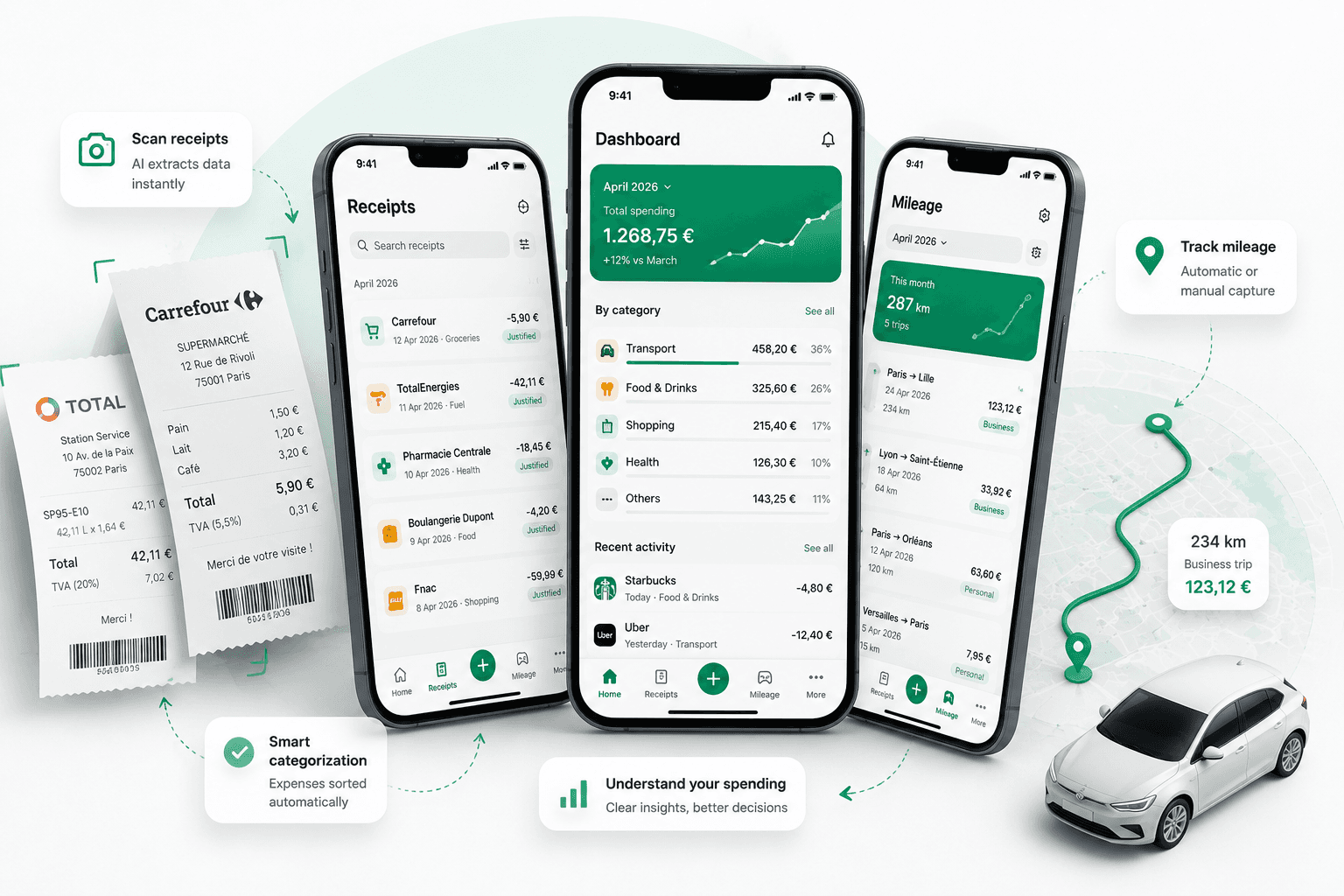
Snap receipts. Track mileage. Get reimbursed faster.
extraction accuracy
receipts scanned safely
Powerful features to simplify your finances
From AI receipt scanning to mileage and cloud sync — everything to simplify your finances.
AI Receipt Scanner
Scan or forward your receipts. Our AI extracts the data instantly.
Mileage Tracking
Auto-detect routes, track in real-time or enter manually. Always accurate.
Smart Expenses
Categorize expenses, add tags, clients and payment methods.
Statistics & Insights
Visualize your spending and mileage with beautiful dashboards.
Reports & Exports
Export expenses, mileage and reports to CSV, PDF and more.
Multi-Currency
Manage expenses in multiple currencies. Perfect for international teams.
Secure & Private
Your data is encrypted and 100% private. We never sell your data.
Cloud Sync
Access your data anywhere, anytime. All your devices stay in sync.
Every kilometre, priced correctly.
No spreadsheet required.
Business driving is an expense like any other — Qendo measures the distance, applies your reimbursement rule, and files the trip beside your receipts.
Route Distance
Type a start and a destination and get the real driving distance, round trip included. Addresses autocomplete as you type.
GPS Tracking
Start the tracker and drive. Distance is measured on the device, so a trip is recorded in full even where there is no signal.
Manual Entry
Already know the distance? Type it in with the purpose, the vehicle and the date. Three taps, done.
Reimbursement Policies
A flat rate per kilometre, or distance bands like the French barème and HMRC rates. Every trip is priced by the rule that applies to it.
Vehicle Fleet
Cars, vans, motorcycles and bikes, each with its own odometer and yearly distance — which is exactly what banded tax rules read.
One Expense Report
Trips land in the same list as your receipts under their own Mileage category, ready to filter, analyse and export.
Get started in 3 simple steps
Capture
Scan receipts or add expenses and mileage manually.
Organize
Qendo automatically categorizes and organizes everything for you.
Analyze & Export
Track, analyze and export reports in just a few clicks.
Loved by teams & individuals
See why thousands of professionals trust Qendo with their expense tracking.
I used to dread expense tracking every month. Now I just snap a photo after every purchase and Qendo does the rest. It's saved me at least 5 hours a month.
The AI accuracy is incredible — it gets the merchant name and amount right even on faded thermal receipts. My accountant loves the export feature.
Multi-currency support is a game changer. I travel across 4 countries a month and Qendo handles every receipt and currency conversion perfectly.
We rolled out Qendo to our 15-person team. Everyone submits expenses in seconds instead of filling out spreadsheets. The ROI was immediate.
I recommend Qendo to all my clients now. The categorization and search features make tax season so much smoother for everyone involved.
No more lost receipts, no more manual data entry. I scan receipts on the go and my expense reports are done before I land. Absolute must-have app.
Simple, transparent pricing
Start free with 10 receipts and 5 trips. Upgrade when you need more.
Free
Perfect to get started
Expense management
- 10 receipt scans total
- AI-powered data extraction
- Basic spending overview
- 1 workspace
- 7-day receipt history
- 5 mileage trips total
- Route, GPS & manual capture
- Reimbursement policies
Solo
For individuals
Expense management
- Unlimited receipt scans ¹
- AI-powered data extraction
- Advanced analytics & charts
- Multi-currency support
- Smart search & filters
- Cloud backup & export
- 5 mileage trips total
- Route, GPS & manual capture
- Reimbursement policies
Plus
For people on the road
Expense management
- Everything in Solo
- Unlimited receipt scans ¹
- Advanced analytics & charts
- Multi-currency support
- Cloud backup & export
- Unlimited mileage trips ¹
- Route, GPS & manual capture
- Distance-band policies (barème, HMRC…)
- Vehicle fleet & odometer tracking
¹ Fair usage policy applies to prevent automated or abusive usage.
Frequently asked questions
Our AI achieves over 99% accuracy on printed receipts and 97%+ on handwritten ones. It continuously improves through machine learning as more receipts are processed.
Yes. Log a trip by route, by GPS or by hand, and Qendo prices the kilometres using your reimbursement rule — a flat rate or distance bands like the French barème and HMRC rates. Trips sit beside your receipts in the same expense report.
Qendo supports 50+ currencies worldwide with automatic detection. Exchange rates are updated in real-time, so your spending totals are always current.
Absolutely. We use AES-256 encryption, TLS 1.3 for data in transit, and our infrastructure is fully GDPR compliant. Your receipt data is never shared with third parties.
Yes — you can export receipts and analytics as CSV, PDF, or JSON at any time. Perfect for tax returns, expense reports, or accounting software imports.
No. The Free plan gives you 10 scans total with no credit card required. You can upgrade to Premium anytime when you need unlimited scans.
Yes! Premium users can create workspaces and invite team members. Each member scans their own receipts, and admins get a unified spending dashboard.
Get in touch
Have a question, feature request, or partnership inquiry? We'd love to hear from you.
Ready to take control
of your expenses?
Join thousands of users who save time and money with Qendo. Download the app — start with 10 free receipts and 5 free trips.